This page shows a practical reference deployment pattern for running Crown on an Ubuntu VPS or a dedicated Ubuntu server with:
- Coolify on the target host
- self-hosted Forgejo on the infrastructure as the Git provider
- a self-hosted OCI registry for private image storage
- a dedicated Coolify build server for remote image builds
- a delivery path of Forgejo → Coolify → build server → registry → runtime host
This is intentionally different from the repo-inferred runtime topology. It explains a recommended production hosting shape rather than a graph that can be derived directly from source code alone.
If you want the other curated Coolify reference shapes, also see:
Official references:
- Coolify build server
- Coolify multiple servers
- Coolify Docker registry
- Forgejo installation overview
- Forgejo installation with Docker
- Forgejo container registry
What “build server” means here
In this page, build server means Coolify's documented Build Server feature — not just any random CI box with Docker installed.
That means the build server is expected to be:
- added to Coolify as a server and marked as a build server
- able to access the application source code
- running Docker Engine
- authenticated with the target container registry
- using the same CPU architecture as the runtime servers
The Coolify docs also call out two important caveats:
- the built image must be pushed to a registry before deployment
- a server marked as a build server is effectively build-only until that option is disabled
If you configure multiple build servers, Coolify may select one at random, so keep them equivalent.
Reference topology

Source: ubuntu-coolify-deployment.mmd
Flow order
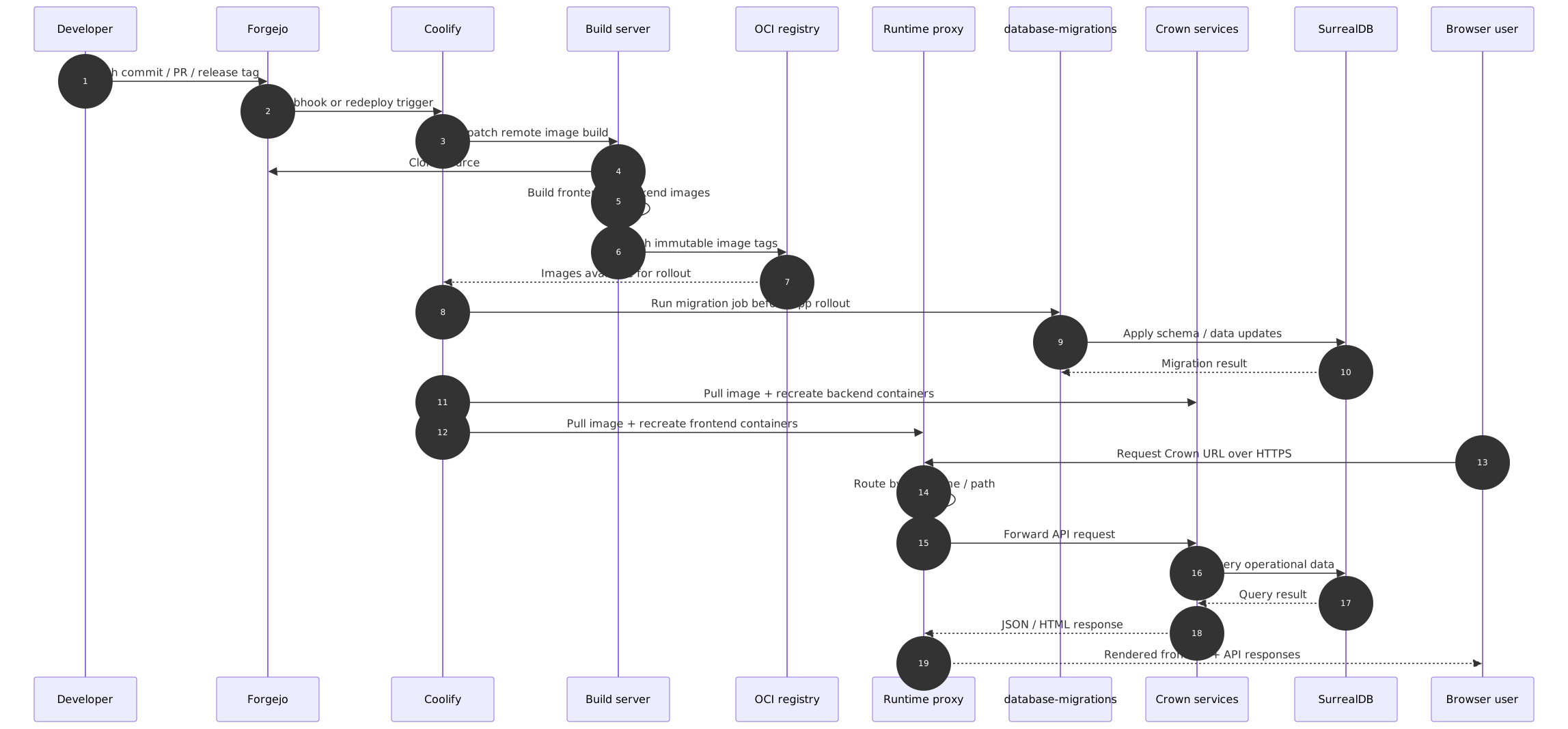
Source: ubuntu-coolify-deployment-flow.mmd
This sequence view shows the end-to-end handoff order between Forgejo, Coolify, the dedicated build server, the registry, the migration job, the runtime host, and the live user request path.
Why this pattern works well
The main idea is simple:
- build somewhere else
- deploy prebuilt images to Ubuntu
- let Coolify handle rollout, routing, TLS, and environment management
That gives you a cleaner production box because the deployed host is responsible for:
- pulling images
- starting/stopping containers
- storing runtime secrets and environment values
- routing HTTPS traffic
- preserving data volumes
Meanwhile, the dedicated Coolify build server is responsible for:
- cloning the source from Forgejo
- running the image build away from the runtime host
- pushing tagged images to the registry
If you also want broader CI gates like linting, integration tests, or policy checks, run those before the deployment trigger. The Coolify build-server feature is primarily about offloading image builds from the runtime host.
In other words: the production host behaves like a runtime, not like a build farm. Much healthier. Less drama.
Main roles in the deployment
| Component | Responsibility |
|---|---|
| Self-hosted Forgejo | Source of truth for code, PRs, and deployment-triggering webhooks |
| Coolify build server | Dedicated build-only server used by Coolify to build images away from the runtime host |
| Self-hosted OCI registry | Stores versioned images for Coolify to deploy |
| Ubuntu VPS / dedicated server | Target runtime host |
| Coolify | Manages apps, environment variables, rollouts, domains, and deploy triggers |
| Reverse proxy | Terminates TLS and routes domains to the correct frontend or API |
| Runtime and delivery storage | Stores operational data, support files, repositories, and image blobs |
Typical deployment flow
- A developer pushes to the self-hosted Forgejo instance or creates a release tag there.
- A webhook or manual action triggers the resource in Coolify.
- The resource is configured with
Use a Build Server?, so Coolify dispatches the build to the dedicated build server instead of building on the runtime host. - The Coolify build server clones the source, builds the image, and pushes a versioned image to the self-hosted OCI registry.
- Coolify then deploys that image to the Ubuntu runtime host.
- The
database-migrationsjob runs before dependent services come up. - Backend and frontend containers are recreated.
- Traffic continues through the reverse proxy using the configured public domains.
What runs on the Ubuntu host
A single Ubuntu VPS or dedicated server can host all of this on one machine:
- Forgejo
- the self-hosted registry
- Coolify control plane
- reverse proxy / ingress
- frontend containers
- backend service containers
- SurrealDB
- named volumes for persisted data
That is usually the simplest starting point.
For a larger dedicated setup, you often keep the same topology but give it more CPU, memory, and storage headroom. The logical layout does not really change — the box just sweats less.
The main catch is that the host is now serving both the runtime and the delivery plane, so repository growth and registry blob growth become operational concerns rather than somebody-else's problem.
Recommended boundary between build and runtime
The Coolify build server should do the image-build work:
- source clone
- dependency install as needed by the image build
- Docker image creation
- image tagging
- registry authentication and image push
The Ubuntu/Coolify host should mainly do runtime work:
- image pull
- container restart / rollout
- env and secret injection
- TLS and domain routing
- volume mounting
- health-check-based recovery
- optionally hosting Forgejo and the registry if you accept the extra shared blast radius
That separation helps because it:
- reduces production-host load
- avoids compiler/toolchain drift on the runtime host
- makes deploys faster and more repeatable
- gives you cleaner rollback behaviour through image tags
Network shape
The public internet should normally only reach:
80/443for HTTP/HTTPS22for SSH, ideally restricted
Everything else should stay internal to Docker networking on the Ubuntu host.
A good baseline is:
- frontends and APIs behind the Coolify-managed proxy
- Forgejo and the registry also behind explicit domains if they are hosted on the same box
- SurrealDB not publicly exposed unless there is a very specific operational reason
- internal service-to-service traffic using container DNS names
- backups and admin access handled separately from user-facing traffic
Data and persistence
In this pattern, the most important persisted runtime state is still:
- the SurrealDB volume
- the support attachments volume
- the Forgejo repository/config data
- the registry blob storage
If you are deploying on a VPS or dedicated host with local volumes, make sure you also have:
- scheduled backups
- restore testing
- disk monitoring
- enough free space for image pulls and log growth
- cleanup policies for stale images and old repository artifacts
Single-host vs split-host options
Single Ubuntu host
Best when you want the simplest path:
- Coolify, reverse proxy, services, and DB all on one VPS/dedicated server
- easiest operational model
- fewer moving parts
- good for early production or smaller workloads
If you want that model documented explicitly as a first-class reference pattern, use Single-server Coolify deployment.
Split build + runtime
Best when you already have CI capacity elsewhere:
- Coolify build server handles image creation away from the runtime host
- Ubuntu/Coolify host only runs workloads
- better resource isolation
- usually the preferred pattern for stable production setups
Split data host
Possible later if needed:
- app/runtime host remains on Ubuntu + Coolify
- database moves to a different machine or managed service
- requires more deliberate networking, backup, and latency planning
If you need full multi-server scale-out rather than only a split build/runtime path, continue with Multi-node Coolify + SurrealDB deployment.
How this fits Crown specifically
For Crown, this pattern maps well because:
- the repo already produces containerized frontends and services
- a migration job exists and should run before dependent services
- frontends are static-container deployments behind a proxy
- services expect internal DNS-based communication in production-style networking
- the platform already benefits from separating build concerns from runtime concerns
- Forgejo can act as the self-hosted Git system while the registry stays private and close to the runtime host
Practical recommendation
If you are deploying Crown to Ubuntu with Coolify, the safest default is:
- Coolify on the Ubuntu target host
- Forgejo as the self-hosted Git provider, ideally with explicit storage and domain routing
- dedicated Coolify build server for remote image builds
- self-hosted OCI registry using immutable image tags
- internal-only database networking
- persistent volumes with backup coverage
That gives you a production flow that is understandable, repeatable, and much easier to reason about during incident response and rollback.